

MappaVita
A SwiftUI travel journal that turns where you've been into a map you can browse — automatic location tracking, photo GPS import, memories, and achievements.
- Type
- Other
- Role
- Solo
- Status
- Archived
- Tech
- Swift SwiftUI MapKit Core Location PhotoKit Core Data Firebase Auth Cloud Firestore Firebase Storage MVVM
- Started
- Apr 2025
- Ended
- May 2025
Overview
Travel is easy to accumulate and hard to keep. A year later the places blur together, and the photos that would remind you are buried in a camera roll sorted by date rather than by where you were. MappaVita is an iOS travel journal built around the opposite index: the map is the primary view, and everything — photos, notes, statistics — hangs off a place.
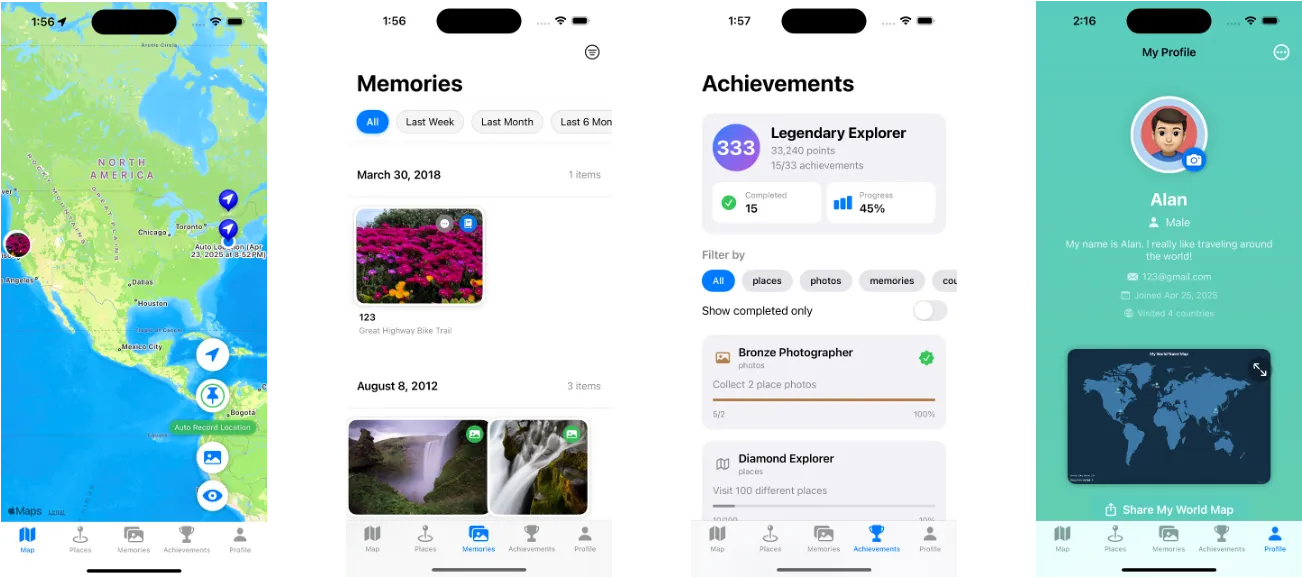
Key features
- Automatic location recording — background Core Location updates with a distance filter, so a new point is only written once you’ve actually moved.
- Photo GPS import — scans the photo library for EXIF location metadata and drops those places onto the map, handling the large share of images that carry no GPS tag at all.
- Manual places — add somewhere by hand with a photo, a date, and a note; reverse geocoding fills in the place name from the coordinates.
- Map first — every place as an annotation, with clustering so a dense city doesn’t turn into a pile of overlapping pins.
- Memories — photos and journal entries attached to a place, browsable as a timeline.
- Statistics and achievements — countries visited, longest distance, most-visited places, consecutive travel days, and badges unlocked from those milestones.
- Share and export — a single place or a rendered snapshot of your whole world map, through the iOS share sheet.
Stack
- SwiftUI + MVVM — 45 Swift files across views, view models, models, and a small core of managers (location, photo location, auth, persistence).
- MapKit — annotations, custom photo annotation views, and
MKClusterAnnotationfor density. - Core Data — local store for places, photos, and memories, so the app works fully offline.
- Firebase — Auth for accounts, Firestore and Storage for sync and photo hosting.
Why archived
MappaVita was a course project, shipped with a written report and a presentation, and it stopped where the semester did. It runs, and the core loop — record, revisit, remember — works; it just never went through the App Store round of polish, permissions copy, and sync hardening that a real release needs. The idea has held up better than the code, and I still think a place-indexed journal beats a date-indexed one.